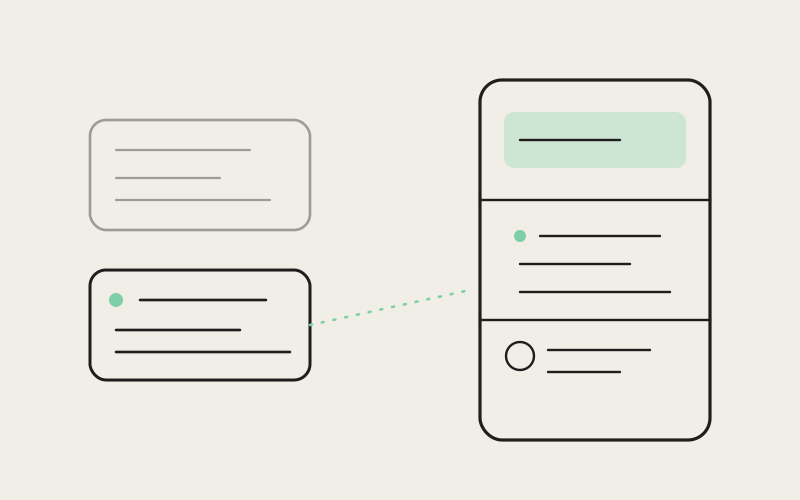
Most side panels in developer tools are static furniture — they show whatever they were last told to show, and it's on you to notice when that's gone stale. Influxx's right rail works differently: it's a persistent panel for an embedded browser tab, source control, and chat, but it also pays attention to which project you're actually looking at right now, and follows you there. That sounds like a small courtesy. In a workspace where five or six repositories can be open at once, it turns out to be the difference between a panel you trust and one you've learned to double-check.
The Cost of a Panel That Doesn't Know Where You Are
Open more than one project in Influxx and you inherit a specific, recurring kind of confusion: you look at the right rail, and what it's showing doesn't match what you're doing. You switched tabs three minutes ago to check something in a different repository, came back, and the panel is still anchored to whatever you were looking at before — a diff from a project you've since left, a browser preview pointed at a server that isn't even running anymore, a source-control status panel reporting on the wrong working tree entirely. None of that is wrong, exactly. It's just old, and old information presented with the same confidence as current information is worse than no information at all, because you have to notice it's stale before you can distrust it.
This is a familiar failure mode outside of Influxx too. Plenty of IDEs and multi-project tools treat a side panel as its own independent surface — you open it, you point it somewhere, and it stays pointed there until you point it somewhere else by hand. That model works fine when you're doing one thing in one project. It breaks down exactly when the workflow Influxx is built for kicks in: several agents, several repositories, several worktrees, all live at the same time, with attention bouncing between them all day.
The Design Goal: a Rail That Follows, Not a Rail That Sits
The goal we set for the right rail was simple to state and harder to get right in practice: the rail should feel like a property of whichever project is active, not like a separate window you have to manage on its own. Switch your attention to a different repository — click into a different tab, activate a different worktree, bring a different pane group forward — and the rail should already be showing you that project's browser tab, that project's source-control status, that project's chat context, without a manual step in between.
That's a different mental model than "a panel with a browser tab, a source control view, and a chat view in it." It's closer to each project quietly carrying its own rail state with it, and the visible rail being a window onto whichever project currently has your attention. The browser tab a project had open stays open for that project. The source-control status for a worktree stays scoped to that worktree. Switch away and back, and everything is exactly where you left it — not because the rail remembered to hold still, but because it's showing you that project's state again, not a shared, generic one.
"The naive version of this feature is a single rail with one browser tab, one source-control view, one chat thread, and you just re-point all three whenever the active project changes. That's simple to build and it's wrong the moment you have two projects open, because now switching back and forth means constantly re-navigating the browser, re-scrolling the diff, re-finding your place in the conversation. What actually had to change was treating rail state as something that belongs to the project, not to the rail. Each project keeps its own browser history, its own source-control view, its own chat context. The rail itself is just the thing that displays whichever project's state is currently in front of you."
— Sofia Marchetti, Desktop Platform Engineer, Influxx
Before and After: Checking a Pull Request While Three Repos Are Open
Picture a fairly ordinary afternoon: three repositories open, an agent working through a refactor in one, a second repository mostly idle while you wait on a teammate, and a third where you just got a notification that a pull request needs a look. In the old model, checking that pull request meant switching tabs, then manually pointing the right rail's browser view at the review page — and if you'd had a diff open in the rail for one of the other two projects, that context was simply gone the next time you switched back, unless you remembered to re-navigate it yourself.
With a rail that follows the active project, switching to the third repository brings its own rail state forward automatically — including, if you'd looked at that pull request in this project before, the browser tab already sitting where you left it. Switch back to the repository where the agent is mid-refactor, and its rail comes back too: same diff, same scroll position, same open chat thread, undisturbed by the detour. Nothing had to be re-found. The three projects weren't sharing one rail that got repointed each time; each one kept its own.
Before and After: From Reading a Diff to Talking to an Agent About It
The second scenario is less about switching between projects and more about switching between the surfaces inside a single one. You're reading a file diff in the rail's source-control view, you spot something you want an agent's opinion on, and you switch the rail over to chat to ask about it. In a rail that treats each surface as fully independent, that switch can feel like leaving the diff behind — you ask your question, get an answer, and then have to go find your way back to exactly where you were in the diff to keep reviewing.
Because the rail is scoped to the active project rather than to whichever surface happens to be selected, moving from the diff view to chat and back again doesn't cost you your place. The diff is still scrolled to where you left it when you return to it, because it never actually went anywhere — you just looked at a different part of the same project's rail state for a minute. The practical effect is that asking an agent about the exact code you're staring at stops being a context switch with a tax attached, and starts being closer to pointing at something on your screen and asking a question about it.
Before and After: Source Control Status Across Worktrees
The third scenario is the one that came up most in early feedback: developers running the same repository across multiple worktrees — one worktree on a feature branch with an agent actively committing to it, another checked out clean for a quick hotfix, maybe a third for reviewing someone else's branch. Source-control status is exactly the kind of information that's actively dangerous when it's stale, because a rail showing yesterday's uncommitted changes while you're actually looking at a different worktree can lead you to believe work is staged, or clean, when it isn't either.
A rail scoped to the active worktree keeps that status honest by construction — switch worktrees and you see that worktree's actual state, not a state left over from whichever one you looked at last. For anyone running several worktrees against agents that commit independently in each of them, that's less a convenience than a basic correctness requirement: the source-control panel has to answer "what does this worktree look like right now," not "what did some worktree look like a few minutes ago."
"I run three or four worktrees against the same repo most days — one for whatever the team's actively shipping, a couple for agents working through backlog items in the background. Before, I'd glance at the rail's source control view out of habit and occasionally act on it — stage something, or decide I didn't need to pull — only to realize a few seconds later I was looking at the wrong worktree's status. It wasn't a huge deal each time, but it added up to a kind of low-grade distrust of the panel. Now the status changes the instant I switch worktrees, and I've stopped double-checking it before I believe it."
— Priya Raghavan, senior backend engineer at a fintech startup
The Real Trade-off: Auto-Following Can Also Be Disorienting
None of this is a pure win, and the team was careful not to pretend otherwise. A rail that eagerly follows your active project is only pleasant when the switch it makes matches the switch you actually meant to make. If the rail jumps to a different project's browser tab or chat thread at a moment you didn't intend — a background notification bringing a project forward, a click that changed focus for a reason unrelated to "I want to look at that project now" — the effect isn't helpful, it's jarring. You look down at the rail expecting to see what you were just looking at, and instead you're looking at something else entirely, with no clear reason why.
That's the actual tension: a rail that never follows anything automatically is safe but tedious, forcing a manual re-point every time you switch projects. A rail that follows every possible signal of "attention moved here" is convenient right up until it moves somewhere you didn't ask it to, and then it's actively confusing — worse, in a way, than a rail that just sits still, because a rail that occasionally jumps on its own trains you not to trust what it's showing without checking first.
Deciding When the Rail Should Hold Still
The resolution wasn't a single clever mechanism — it was being deliberate about which actions count as "the user changed what project they're working on" and which don't. Switching to a different worktree, activating a different pane group, bringing a different project's tab to the front — those are treated as genuine intent to change context, and the rail follows. Passive events that merely touch a project without indicating you want to work in it right now don't trigger the same automatic switch. The line isn't perfect, and the team keeps adjusting where it sits, but the underlying principle held up: the rail should follow decisions, not incidental focus changes.
"It would have been easy to ship the version where the rail chases every signal it can find, because on paper that looks like more automation, more magic. What we actually heard from people testing early builds is that a panel that moves on its own, even in a technically correct direction, reads as unpredictable if the user didn't consciously ask for it. We ended up caring less about maximizing how often the rail auto-switches and more about making sure that when it does, it's always because of something the user unambiguously did — not something that happened near them."
— Marcus Idehen, Director of Product Engineering, ETAPX
What This Means for Working Across Several Projects at Once
Put together, the effect is less about any single scenario and more about a change in how much the rail asks you to think about it. Instead of treating the right rail as a shared resource you have to manage — remembering what you last pointed it at, re-navigating it after every context switch — it behaves like a property that belongs to the project you're in. You stop thinking about the rail as a separate thing to maintain, and it starts feeling like it was simply always there, showing you the right thing, because in a real sense it was — it just wasn't the part of your screen that was moving.
The honest limitation is that "which actions count as changing context" is a judgment call, and it won't match every user's mental model in every situation. Some developers want the rail to follow more eagerly than it currently does; others have hit moments where it followed when they'd have preferred it stay put. That boundary is still being tuned, and it's the kind of thing that improves gradually with real usage rather than getting solved once and left alone.
Frequently Asked Questions
What is the right rail in Influxx used for?
It's a persistent panel alongside the main workspace that holds an embedded browser tab, a source-control view, and chat with an agent. Rather than being a single shared surface, its state is scoped to whichever project or worktree is currently active, so each project effectively carries its own rail state with it.
Does the right rail update automatically when I switch projects?
Yes, for actions that represent a genuine change of context — activating a different worktree, bringing a different project's pane group forward. The rail then shows that project's own browser tab, source-control status, and chat, rather than whatever was last displayed.
Will the source-control status in the rail ever show me the wrong worktree?
The rail is designed specifically to avoid that: source-control status is scoped to the active worktree, and it updates the moment you switch, rather than persisting a previous worktree's state. That matters most when you're running the same repository across several worktrees at once.
Can switching to chat in the rail lose my place in a file diff?
No. Because rail state belongs to the project rather than to whichever surface is currently selected, switching from the source-control diff view to chat and back preserves your scroll position and context in the diff — it isn't reset by the detour.
Does the rail ever switch context when I didn't want it to?
It can, and it's the trade-off the team is most upfront about. A rail tuned to follow every possible signal of attention would switch more often but less predictably. Influxx limits automatic switching to actions that clearly represent changing what you're working on, though that boundary is still being refined based on real usage.
Is the right rail available on every platform Influxx supports?
The right rail is part of the desktop workspace, where multiple projects, worktrees, and agent sessions are typically open side by side — the exact situation where a panel that knows what project you're in matters most.
How is this different from just having a browser tab and a source control tab open separately?
The difference isn't the individual surfaces — it's that they're bound together per project. A separate browser tab and source-control tab don't know about each other or about which project you're currently focused on; the rail's surfaces do, which is what lets all three snap to the correct project together instead of requiring you to re-point each one by hand.
A side panel that knows what project you're in sounds like it should have been obvious from the start, and in hindsight, it mostly reads that way — of course a rail attached to a multi-project workspace should behave like it belongs to the active project. Getting there meant admitting that the simpler version, a single rail state shared across everything, quietly punished exactly the workflow Influxx is built around: several repositories, several worktrees, several agents, all live at once. The rail that follows isn't a flashy feature. It's the panel finally agreeing with you about what you're looking at.