You're three blocks from the train, laptop already zipped into your bag, when it hits you: the dev server from this afternoon is still running. Maybe two of them are. You pull out your phone half-expecting to be helpless about it — and instead you open Influxx Mobile, tap into SurfStack, and stop the thing from your pocket before you've even reached the platform.
The Forgotten Process Problem
Every developer has some version of this story. You kick off a local server to check something, get pulled into a meeting, and by the time you remember it, you're already home, or on a train, or standing in a coffee line with your laptop closed in a bag. Multiply that by however many projects you've got open on a given day — a couple of dev servers, a script an agent kicked off to watch a build, a preview process you spun up just to eyeball a change — and it adds up to a quiet, familiar kind of low-grade guilt. Nothing is on fire. But something you forgot about is sitting there, warming up your laptop, chewing through battery, for no reason at all.
The usual answer has always been "deal with it later" — which really means dealing with it never, until the fan won't stop spinning or the laptop won't sleep properly, and you finally trace it back three tabs deep to a server you started before lunch. Or the answer is worse: you don't deal with it at all, because you're not at your desk, and going back just to close a terminal window feels like too much friction for too small a problem. So it keeps running.
What SurfStack Already Does on Desktop
On Influxx desktop, SurfStack is the answer to "what is actually running right now, across everything I have open." It's a single view that lists every dev server, script, and background process your agents have spawned across your projects — not per-project, not scattered across a dozen terminal tabs you have to click through one at a time, but one place that shows you the whole picture. From there you can pause something, restart it, or stop it outright, without hunting down which terminal it's attached to or remembering which project you launched it from.
It exists because parallel agent work multiplies exactly the kind of clutter that used to be rare. When you've got several agents working across several projects, each one might spin up its own server or script along the way, and those processes don't politely announce themselves when they're done being useful. SurfStack was built to be the one place you look to find out what's actually alive.
The Same View, Now in Your Pocket
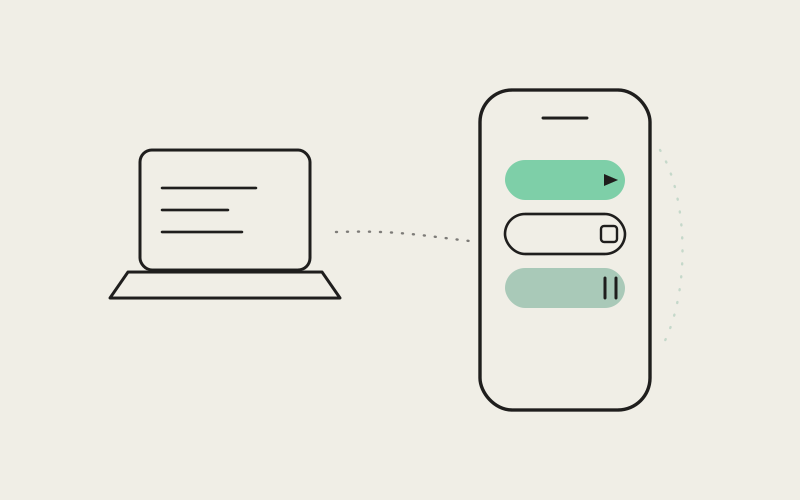
What's new is that this same view — the same list, the same at-a-glance sense of what's running and where — now lives on Influxx Mobile too. It isn't a stripped-down summary or a "check back on desktop for details" placeholder. It's SurfStack, matching the desktop experience, sized for a phone screen. Open the app, tap into SurfStack, and you see the same processes desktop would show you: which project they belong to, what they are, and whether they're currently running, paused, or stopped.
From there, the same three actions are one tap away. Pause something that's just sitting there being wasteful. Restart something that's stuck in a bad state. Or stop something entirely, the way you would if you were sitting at your desk closing the terminal window yourself. None of it requires opening the laptop.
A Concrete Version of the Moment
Here's what that actually looks like on an ordinary day. You left the office — or just left your desk for a long lunch — and somewhere around the second block of the walk, you remember: the local server for that redesign preview is still running. You forgot to stop it before you closed the lid. Normally this is the kind of thing that gnaws at you a little for the rest of the afternoon, not because it's a crisis, just because it's an open loop.
Instead, you take out your phone, open Influxx Mobile, and go to SurfStack. The process is right there, labeled with the project it belongs to, sitting in a running state exactly like it would if you'd looked at your laptop screen. You tap it, tap stop, and it's done. You put your phone back in your pocket and keep walking. No detour back to the office, no remote-desktop workaround, no mental note to "deal with it tonight." The loop closes in about the time it takes to check a text message.
"People don't think of a stray dev server as an emergency, and it isn't one — that's exactly why it never gets fixed in the moment. It just sits there being a small waste until you happen to be back at the machine. We wanted the fix to be as low-effort as the problem is low-stakes. If stopping something forgotten takes longer than remembering you forgot it, most people just won't bother, and the process keeps running. SurfStack on mobile is built for that gap specifically — the two minutes between remembering and being back at your desk."
— Yuki Tanabe, Mobile Infrastructure Engineer, Influxx
Why This Matters Beyond Battery Life
Battery drain is the easiest way to describe the problem, but it's not the only reason a forgotten process is annoying. A dev server or script that's still running can hold onto a port you need for something else, quietly slow down a machine you're trying to use for other work, or just be one more thing cluttering the mental model you keep of "what's going on right now across my projects." None of that requires the process to be actively harmful. It just requires it to be unaccounted for.
Having SurfStack on your phone turns "unaccounted for" into something you can check in ten seconds, whether you're commuting, between meetings, or lying on the couch with your laptop across the room. You don't need a reason to check it beyond mild curiosity — glancing at what's currently running across your projects becomes as casual as checking notifications.
A Stuck Process You Can't Get Back To
The battery-drain scenario is the everyday one, but there's a sharper version of the same problem: a process that's stuck, not just idle. Something hung, something that stopped responding the way it should, something you'd normally kill and restart without a second thought if you were sitting in front of it. When you're away from your desk, that kind of stuck process used to just have to wait — for you to get home, for you to remote in some clunkier way, or for you to accept that whatever depended on it is stalled until you're back.
Now the fix is the same three taps as the battery scenario: open SurfStack, find the process, restart it. You don't have to be at your desk to un-stick something that's stuck at your desk. That's a small thing until the one time it isn't — until it's the difference between a colleague waiting on a build for twenty extra minutes and a build that's moving again by the time they've noticed it stalled.
"I was at my kid's soccer practice when a teammate messaged asking if the preview server for our shared branch was down — it was, and I'd completely forgotten I'd left it running that morning in a weird half-stuck state. A year ago that would've meant 'sorry, I'll fix it when I'm back in a couple hours.' Instead I pulled up Influxx Mobile on the sideline, found it in SurfStack, restarted it, and told him to try again. He was back to work before I even sat back down."
— Priya Chandrasekaran, platform engineer, Influxx user
What This Doesn't Do
It's worth being direct about the boundary here, because it's an easy one to assume away. SurfStack on mobile shows and controls what's already running — it doesn't give you a way to start something brand new from your phone that wasn't already launched from your desktop. If you never kicked off that dev server in the first place, there's nothing for your phone to show you or stop. This is a remote control for processes your desktop already spawned, not a way to launch fresh work from a phone screen.
That's a deliberate line, not an oversight we're planning to erase. Starting a new process usually means picking a project, a command, and a context that's much easier to get right sitting at a keyboard than tapping through a phone screen. The problem SurfStack on mobile solves is specifically the one where something is already running and you're not where you need to be to manage it — not the problem of kicking off new work remotely. If that ever becomes a real, well-scoped need for people, it's a different feature with different tradeoffs, and not one we're pretending SurfStack already covers.
Designed to Feel Like the Same App, Not a Cousin of It
One thing we paid attention to is that this shouldn't feel like a mobile-flavored reinterpretation of SurfStack, where you have to relearn what a label or a status color means because someone redesigned it for a smaller screen. It's the same categories, the same states, the same actions, just laid out for a thumb instead of a cursor. If you know what "paused" looks like on desktop, you already know what it looks like on your phone. A lot of mobile companion apps end up feeling like a different product wearing the same name — different terminology, a feature set quietly trimmed down until it barely resembles the thing it's supposed to companion. We didn't want that. We wanted SurfStack on mobile to be recognizably the same feature, just reachable from a different pocket.
That consistency matters more than it might sound like on paper. The whole value of glancing at your phone to check on something is that you don't have to think hard about what you're looking at. If the mobile version used different words for the same states, or organized things in a way that didn't match what you're used to on your laptop, every glance would come with a small tax of re-orienting yourself. Keeping it the same removes that tax entirely.
Frequently Asked Questions
Can I stop a dev server from my phone with Influxx Mobile?
Yes. Open Influxx Mobile and go to SurfStack, and you'll see every dev server, script, and background process currently running across your projects. Tap the one you want and choose to pause, restart, or stop it — the same three actions available on desktop.
Does SurfStack on mobile show everything running on my desktop, or just some of it?
It shows the same full picture desktop shows you — every process your agents have spawned across every project, not a filtered or partial view. If it's running and desktop SurfStack can see it, mobile SurfStack can see it too.
Can I start a new dev server or script from my phone?
No, and this is worth being upfront about. SurfStack on mobile controls processes that were already launched from your desktop — it doesn't give you a way to start something brand new from your phone. It's a remote control for what's already running, not a way to kick off fresh work remotely.
What happens if I stop a process from my phone by accident?
Stopping something through SurfStack on mobile does exactly what stopping it on desktop would do — the process shuts down the same way it would if you'd closed it yourself at your machine. If you stop the wrong one, you can restart whatever you meant to stop, and start the one you actually wanted from your desktop the next time you're there, the same as you'd recover from any accidental close on a laptop.
Do I need my laptop to be open or awake for this to work?
Your machine needs to be on and reachable for Influxx Mobile to see and control what's running on it — think of it the way you'd think about checking on any other process on a computer that's turned off versus one that's on and idle in the background. A fully shut-down laptop isn't running anything for SurfStack to show you.
Is this the same SurfStack feature as the one on desktop, or a simplified version?
It's the same feature — same categories, same states, same actions — just laid out for a phone screen instead of a monitor. We built it to match the desktop experience deliberately, so you don't have to relearn anything switching between the two.
Will this drain my phone's battery the way a forgotten dev server drains a laptop's?
No. Checking SurfStack on your phone is a quick glance at a list, not a persistent connection doing heavy work in the background. The whole point is trading a laptop quietly running something you forgot about for a phone screen you check for a few seconds and then put away.
The moment this feature is built for isn't dramatic. It's the small, specific relief of remembering something you forgot, checking your phone instead of shrugging it off, and watching the open loop close in the time it takes to read this sentence. You're still not starting anything new from the train platform or the soccer sideline — that part still waits for your desk. But the part that used to nag at you all afternoon doesn't have to anymore.